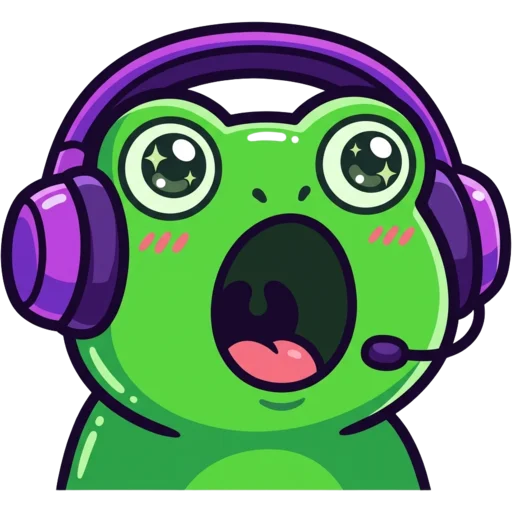
AI emotes on Twitch Emote Maker are made in two steps: Google’s Nano Banana 2.1 model draws each one on a plain white background, then a background-removal model cuts it out into a 1024 px transparent PNG. Your browser then resizes that file to 112, 56 and 28 px, sharpening the small sizes.
Which AI models make the emotes
We use two models, both called through WaveSpeed. Google’s Nano Banana 2.1 does the drawing: its text-to-image version handles emotes from a typed idea, and its image edit version handles emotes made from a selfie or a pet photo. A separate background-remover model then cuts the character out.
We picked them after a side-by-side test on October 31, 2026. These were the candidates and what we saw:
| Step | Model | What we saw |
|---|---|---|
| Text to emote | Google Nano Banana 2.1 text-to-image | All 6 styles usable. Thick outlines, big heads, centred. The plain white background we asked for came back every time. |
| Photo or pet to emote | Google Nano Banana 2.1 image edit | Kept pink hair, a beard, glasses and a beanie, and a ginger cat’s markings. Took 23 to 96 seconds. |
| Background removal (chosen) | WaveSpeed image background remover | 4 to 11 seconds. Clean edges with no white fringe on dark or light chat. |
| Background removal (compared) | Bria remove-background | No visible difference from the one we chose. |
| Transparent output in one step (compared) | Ideogram v3 generate-transparent | The frog came out in one colour with missing facial features. Not used. |
The one-step transparent model looked tempting because it skips background removal. In our test it simply drew worse emotes, so we kept two steps.
How an AI emote is made, step by step
Every emote, sub badge, sticker and logo follows the same path from your idea to a file you can upload to Twitch:
- Moderation. The text you type and any photo you upload are checked first. Hateful, sexual or violent requests are refused before anything is generated.
- Generation. Nano Banana 2.1 draws one square image at 1024 px on a plain white background, using your idea, your style choice and our emote prompt rules.
- Background removal. The background-remover model turns the white background transparent, so the emote sits cleanly on both dark and light chat.
- Saving. The transparent PNG is saved to My Emotes in your account.
- Resizing. When you download, your browser makes the 112, 56 and 28 px Twitch files (72, 36 and 18 px for badges) plus Discord, Kick, YouTube, 7TV and BTTV sizes from the 1024 px original.
Banners, panels, offline screens and profile pictures skip the cut-out step because they are meant to have a full background. Try the whole flow on the AI Twitch emote maker or the multi-platform emote maker.
Why AI emotes need thick outlines and a big head
Because most viewers see your emote at 28×28 pixels, which is 784 pixels in total. A face with thin lines and soft shading turns into a coloured smudge at that size. So before your idea reaches the model, we add rules written for readability:
- A big head and a very expressive face.
- A thick, clean dark outline around the whole silhouette.
- Simple bold shapes and flat colours with minimal shading.
- Head or head-and-shoulders framing instead of a full body.
- The subject centred and filling about 85% of the canvas.
- Few small details, and a plain white background ready for cut-out.
Your chosen style (cute, chibi, pixel, 3D, meme, bold lines, kawaii or anime) is layered on top of these rules. That is why a 3D ghost and a pixel frog from our generator both still read as emotes in a busy chat.
Our 28 px test of AI emotes
On October 31, 2026 we generated six text emotes in six styles, two selfie emotes from test photos of fictional streamers, and one pet emote. We placed each one at 112, 56 and 28 px on a dark and a light chat background and looked at what survived.
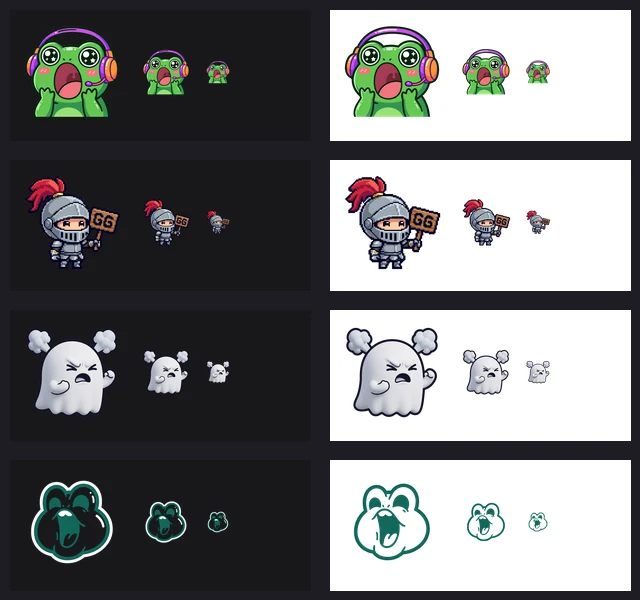
- Emotes with thick outlines, a big head and a centred subject stayed recognisable at 28 px in all six styles.
- The full-body pixel knight and its small “GG” sign did not read at 28 px. That is why head or half-body framing is our default.
- The white ghost stood apart from the light background only because of its dark outline, so the outline rule stays on for every style.
- The selfie emotes kept the features that make a person recognisable: pink hair in one, beard, glasses and beanie in the other.
- The ginger cat kept its fur pattern after the pet-to-emote edit.
More on sizes and what makes emotes blurry is in our Twitch emote size guide.
How resizing works in your browser
Resizing runs on your device, not on our servers. Shrinking 1024 px straight to 28 px in one jump throws away detail unevenly and leaves jagged edges, so we scale in steps instead: the image is halved again and again, never more than 2× per step, until it is within 2× of the target, then drawn at the final size with high-quality smoothing.
At 56 px and below, a light sharpening pass brings the outline back. Pixel-style emotes skip smoothing entirely so their hard pixel edges stay hard. The output is PNG, so transparency is kept at every size.
The same code powers our free Twitch emote resizer, which never uploads your image. You can use it on art you drew yourself.
Checks shown on every result
Each finished emote comes with a few quick checks, so you know it is ready for Twitch before you download:
- Transparent: we read the four corner pixels of the image and confirm they are see-through.
- Sizes: the 112, 56 and 28 px versions (72, 36 and 18 px for badges) are built and shown at real size.
- Under 1 MB: Twitch’s file limit for each emote size.
- Live chat preview: your emote at 28 px inside a mock chat, with a light mode switch to check both themes.
What happens to your photos and emotes
Uploaded photos are deleted automatically 24 hours after upload. The emotes you create are saved in your account under My Emotes until you delete them or your account, and deleting one removes the file from our storage. Emotes stay private unless you share them to the public gallery.
We do not use your photos, prompts or results to train AI models. The full detail is in the privacy policy.
Limits of AI-made emotes
AI emotes are good, not perfect. These are the weak spots we have seen:
- Text inside an emote can come out garbled, and even clean text is hard to read at 28 px. One short word like “GG” is the most we recommend.
- Photo emotes keep your main features, but the likeness is a cartoon, not a portrait. Some results will look more like you than others.
- Sometimes the first result is just not right. Regenerating with a slightly different idea usually fixes it.
- Photo emotes can be slow. Our slowest test took 96 seconds.
If a generation fails, the credits go straight back to your balance. Prices for each item are on the pricing page.